

The Microsoft Dynamics 365 vs Salesforce question usually starts somewhere specific. Your IT team pushed back on the Salesforce quote. Or the new VP of Sales arrived with a Salesforce mandate and someone needs to pressure-test it. Either way, the decision has already started moving before anyone opened a comparison article. This won't tell you which platform is objectively better. It will tell you which one fits the situation you're actually in.
If your company runs on Microsoft 365, Teams, and Azure, Dynamics 365 deserves serious consideration. If your sales process is complicated, your integration requirements are deep, or you've outgrown every simpler CRM you've tried, Salesforce is the harder platform to walk away from.
- Best for Microsoft-first organizations: Dynamics 365 Sales, with native Teams, Outlook, and SharePoint integration built in from day one.
- Best for customization and ecosystem depth: Salesforce Sales Cloud, with 7,000+ AppExchange apps and pro-code Apex flexibility.
- Implementation timelines: Dynamics 365 typically deploys in 2-4 months for Microsoft shops. Salesforce enterprise implementations average 3-6 months.
Choosing between Microsoft Dynamics 365 and Salesforce?
We help Microsoft-first and enterprise teams pick the platform that fits their stack, not just the one with the louder sales pitch.
- Microsoft Dynamics 365 fits Microsoft-first organizations: If your team already lives in Teams, Outlook, and SharePoint, Dynamics 365 doesn't feel like a new tool. It feels like a tab that was always supposed to be there. The adoption barrier is genuinely lower for teams already inside that ecosystem.
- Salesforce wins on customization and ecosystem depth: The AppExchange has 7,000+ apps. Apex lets developers build virtually anything. The partner network is the largest in the CRM industry. The tradeoff: it takes more time to implement correctly and more money to run well at scale.
- Total cost of ownership is closer than list price suggests: Dynamics 365 Professional at $65 looks affordable until you add Customer Insights, Customer Service, and Power Platform licensing. Salesforce Enterprise at $165 looks expensive until you realize that tier covers what most enterprise teams actually need. Budget for implementation on top of either.

Microsoft Dynamics 365 is not one product. It's a suite covering CRM, ERP, and operations, sold in modules. For sales teams, the core stack is Dynamics 365 Sales with Customer Service and Customer Insights added as needed. What makes this different from a standalone CRM is the architecture. Teams, Outlook, Excel, and SharePoint aren't integrations to configure. They're the environment the CRM lives inside. For organizations already built on that stack, it means the CRM arrives without friction, not because of a clever connector, but because it was designed for the same platform.
Key Features
- Dynamics 365 Sales: Pipeline management, lead management, sales forecasting, and AI guidance through Microsoft Copilot.
- Power Platform: Power BI for reporting and analytics, Power Automate for workflow automation, and Power Apps for low-code custom application development.
- Microsoft Teams integration: Native two-way sync between CRM records and Teams calls, meetings, and conversations.
- Customer Insights: Microsoft's customer data platform for segmentation, journey orchestration, and AI-driven personalization.
- LinkedIn Sales Navigator: Built into the Premium tier, giving sales teams prospect intelligence without leaving the CRM.
Pricing Structure
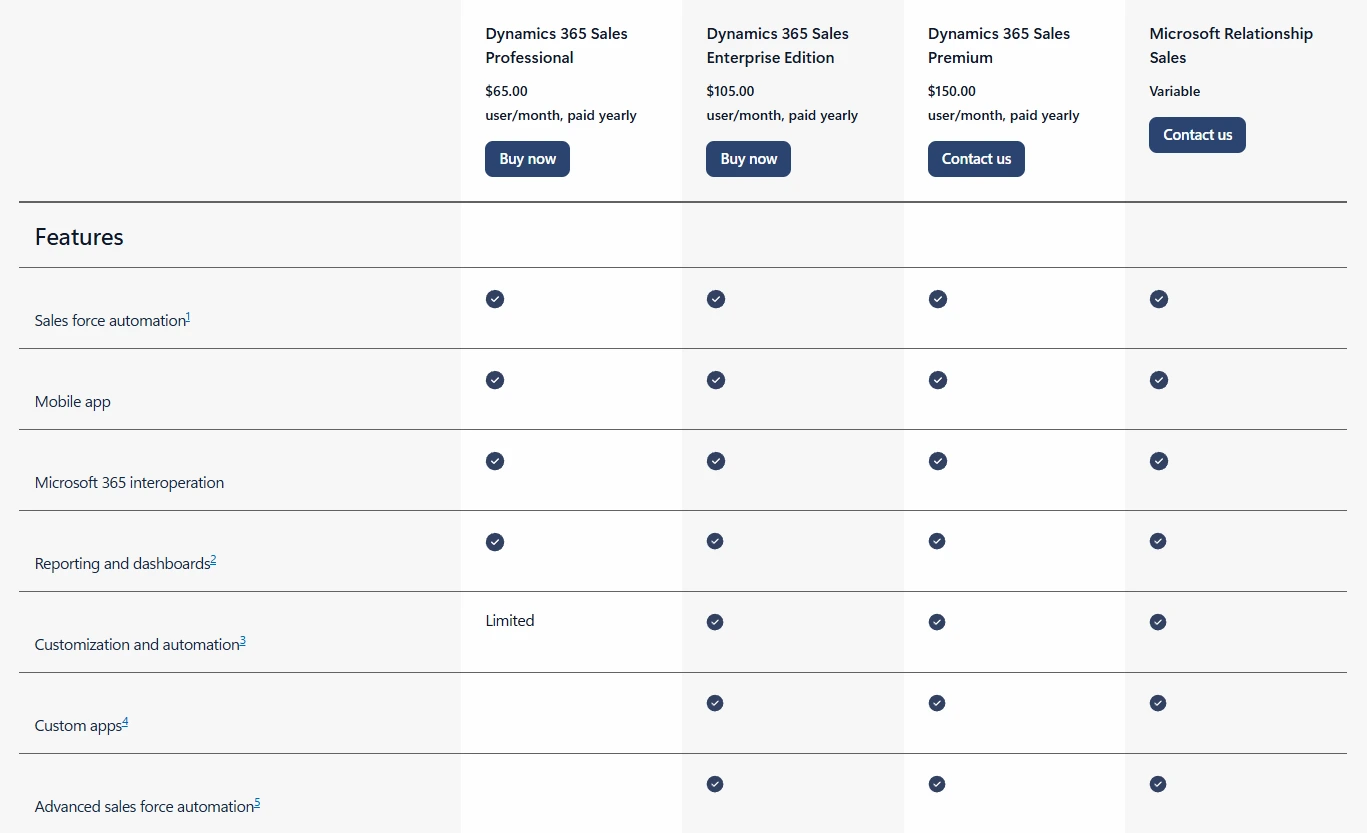
- Dynamics 365 Sales Professional: $65/user/month
- Dynamics 365 Sales Enterprise: $95/user/month
- Dynamics 365 Sales Premium: $135/user/month
- Pricing as of June 2026. Customer Insights, Customer Service, and other modules are licensed separately and add materially to total cost.
Our Take
Dynamics 365 makes the most sense when the decision was effectively made before anyone opened the evaluation: your company is Microsoft-first, and the CRM should be too. That's a legitimate reason to choose a platform. The adoption math is genuinely different when the CRM appears inside tools people already use daily. Where organizations run into trouble is the licensing model. Microsoft prices each module separately, and the total picture rarely matches the entry-tier number in the original quote. We've seen companies commit at $65 per user and discover the stack they actually need costs closer to $200 once Customer Insights and Customer Service are added. Map every module before finalizing a budget. For how another competitor stacks up, see our Zoho CRM vs Salesforce comparison.
Salesforce's market share isn't an accident. The underlying data model is the reason. You can configure nearly every object, field, and workflow to match how your business actually operates. Sales Cloud is the CRM core. Einstein AI layers predictive scoring and deal intelligence on top of it. Agentforce is a different category from the others: it doesn't surface insights for a rep to act on, it acts autonomously on behalf of the team. The AppExchange extends all of this with 7,000+ apps across every integration category. For companies that have outgrown simpler CRMs, that combination is genuinely hard to replicate anywhere else.
Key Features
- Sales Cloud: Comprehensive pipeline management, lead management, sales forecasting, and process automation through Flow.
- Einstein AI and Agentforce: Predictive lead scoring, opportunity health scoring, conversation intelligence, and AI agents that execute sales tasks autonomously.
- AppExchange: 7,000+ pre-built integrations covering ERP systems, marketing automation platforms, document management, and industry-specific tools.
- Apex and Flow: Low-code and pro-code customization lets teams build workflows and data models that most platforms can't replicate without workarounds.
- Service Cloud and Marketing Cloud: Full customer lifecycle coverage on the same platform, avoiding fragmented data between sales and service teams.
Pricing Structure

- Salesforce Starter Suite: $25/user/month
- Salesforce Pro Suite: $100/user/month
- Salesforce Enterprise: $165/user/month
- Salesforce Unlimited: $330/user/month
- Pricing as of June 2026. Einstein AI add-ons, Data Cloud, and Agentforce are priced separately. Most enterprise deployments require Enterprise tier or higher.
Our Take
Salesforce earns its cost when deal cycles are long, approval chains are complex, and the CRM needs to model that complexity exactly. The platform handles this category of problem better than almost anything else on the market. The honest catch: it needs a real implementation to deliver that value. Companies that treat Salesforce as plug-and-play tend to see poor adoption within six months. Not because the platform failed. Because nobody built it to match how the team actually sells. Our HubSpot vs Salesforce comparison covers this tradeoff for teams weighing a simpler alternative.
Pipeline Management and Sales Forecasting
Dynamics 365 Sales covers the pipeline basics competently. Standard stages, forecasting, and relationship analytics do what they say. For teams with predictable, single-product sales cycles, that's often enough. The problem shows up when the deal structure doesn't fit the standard model. Multiple products, branching approvals, non-linear stages: that's where Dynamics 365 runs out of configuration space. Salesforce doesn't. The opportunity object is built to model exactly how the team sells, not a generic approximation of it. Einstein forecasting then works from that actual structure, so the pipeline report reflects what's really happening.
Winner: Salesforce. Configurable opportunity management and Einstein forecasting give enterprise sales teams more accurate pipeline intelligence.
Microsoft 365 and Teams Integration
This is where the Salesforce vs Microsoft Dynamics 365 comparison has a clear answer. Dynamics 365 doesn't integrate with the Microsoft stack. It runs on it. There's no connector between the CRM and Outlook. There's no sync between Teams calls and the contact record. The data is already there because the system is already there. Salesforce can connect to Microsoft tools through AppExchange, but each connection requires setup, testing, and ongoing maintenance. If your team manages their week in Outlook and logs calls in Teams, they will feel that difference on day one of their Salesforce implementation. Not a theoretical difference. A daily one.
Winner: Microsoft Dynamics 365. Native Microsoft 365 and Teams integration is the strongest structural argument for Dynamics 365 over Salesforce.
AI Features: Copilot vs. Einstein and Agentforce
Microsoft Copilot is embedded in Dynamics 365 and genuinely useful. It handles the work that burns rep time: meeting summaries, email drafts, next-step prompts. The advantage is where it surfaces. Reps get these inside Outlook and Teams, not inside a separate AI dashboard they won't open. Salesforce Einstein AI does the same things but builds them into the pipeline workflow. Lead scoring and deal health signals are part of the opportunity view. Risk flags appear in the forecast module. The insights live where reps are already making decisions. Agentforce goes further still. It doesn't surface insights and wait. It takes action on prospecting, case routing, and service tasks without a rep triggering it. Copilot is catching up. But Agentforce launched with CRM-specific capabilities that Copilot hasn't matched yet. For context on how other platforms approach AI, see our Salesforce alternatives guide.
Winner: Salesforce. Einstein AI and Agentforce deliver more CRM-native intelligence than Microsoft Copilot at this point in the product cycle.
The platform matters less than the implementation behind it.
Most CRM projects stall on scoping and adoption, not software. We scope Dynamics 365 and Salesforce builds to match how your team actually sells.
Customization: Power Platform vs. AppExchange and Apex
Power Platform covers the common cases well. Low-code app development, workflow automation, and reporting are all available without requiring a developer. Most mid-market teams never push past what those tools can handle. But there is a limit. Salesforce extends further. Apex lets developers build CRM logic that most platforms can't replicate without workarounds. Flow handles automation that branches in ways Power Automate can't. The AppExchange adds 7,000+ apps across every integration category. For companies with industry-specific data models or complex multi-system approval chains, that gap is often the deciding factor. The Salesforce customization work we handle at Capital S regularly involves builds that Power Platform simply can't accommodate.
Winner: Salesforce. AppExchange depth and Apex pro-code flexibility give Salesforce a broader ceiling for complex enterprise builds.
Pricing and Total Cost of Ownership
The Microsoft Dynamics 365 vs Salesforce pricing gap looks significant at the entry tier. $65/user/month versus $165/user/month is real. The problem is those tiers don't cover the same feature set. Compare feature-equivalent options: Dynamics 365 Enterprise at $95 sits near Salesforce Pro Suite at $100. The gap closes quickly. Then come the add-ons. Microsoft's Customer Insights and Customer Service each carry separate licensing. Salesforce prices Einstein AI and Data Cloud on top of the Enterprise base. By the time you've built the actual stack your team needs, the gap has often closed to near zero. Model total year-one cost, including API integration and implementation services, not list price.
Winner: Microsoft Dynamics 365. Lower base licensing and Microsoft bundle discounts give Dynamics 365 a real cost advantage for teams without heavy customization requirements.

- G2 Score: 3.8/5 (1,700+ reviews)
- Capterra Score: 4.3/5 (5,500+ reviews)
- What users praise: Native Microsoft 365 and Teams integration, familiar Office-style interface, Power BI reporting capabilities, LinkedIn Sales Navigator access in Premium
- Common criticism: Complex, module-by-module licensing; steep learning curve beyond basic sales workflows; customer support response times; cost spikes when adding Customer Insights or Customer Service modules
- Bottom line: Strong reviews from Microsoft-native organizations; mixed feedback from teams that don't already live inside the Microsoft ecosystem

- G2 Score: 4.4/5 (22,000+ reviews)
- Capterra Score: 4.4/5 (18,000+ reviews)
- What users praise: Customization flexibility, AppExchange ecosystem depth, reporting and sales analytics capabilities, Salesforce Trailhead for team upskilling
- Common criticism: High per-user cost at Enterprise and above; add-on pricing for AI features and Data Cloud; complexity for smaller teams with straightforward sales processes
- Bottom line: The market-leading score reflects real platform depth; the criticism reflects what happens when companies buy more platform than they're prepared to implement
The honest trade-offs on both sides, for anyone still in the Salesforce vs Microsoft Dynamics 365 evaluation before a final call.
Microsoft Dynamics 365 Pros and Cons
Salesforce Pros and Cons
Total Cost of Ownership and Budget Planning
The Microsoft Dynamics 365 vs Salesforce pricing comparison always starts with per-seat licensing. That number matters but it's not the one to optimize for. Add-on modules, premium AI tiers, and integration licensing push total cost well above the per-seat figure. Implementation services add to that, typically one to two times first-year licensing. API integration work for ERP, billing, or marketing connections can add as much again. Map every module before negotiations start. The entry-tier number is almost never what anyone actually pays by go-live.
User Adoption and Change Management
The leading cause of CRM failure isn't the platform. It's what happens in the three months after go-live. Structured onboarding, documented processes, and rep coaching in that window are what actually determine adoption. Without them, the tool gets used for a quarter and quietly abandoned. Salesforce has Trailhead for structured self-paced training. Dynamics 365 benefits from Microsoft's existing L&D ecosystem. Both help. Neither replaces the actual change management work. Teams that skip it typically see fewer than 60% of users logging data consistently at three months. At that point, the CRM has stopped being a sales tool. It's an expensive contact list that no one trusts.
The Microsoft Dynamics 365 vs Salesforce question is one we field regularly. The answer is almost always the same: the platform choice follows from the stack, not the other way around. A 300-person company that already runs on Microsoft 365 usually gets faster time-to-value from Dynamics 365. The adoption barrier drops because the CRM lives inside tools people already use every day. For a professional services firm with multi-stage deal cycles and deep ERP integration requirements, Salesforce earns its cost. The platform can model complexity that Dynamics 365 would need workarounds to handle. Choosing the wrong platform doesn't ruin companies. Choosing the wrong platform and underinvesting in the implementation does.
Capital S has been a certified Salesforce implementation partner since 2018. We work in private equity, medical devices, pharma, and professional services. These industries don't have straightforward sales processes. That's why they call us. We're not a reseller. When clients ask if Salesforce is right for them, we give an honest answer, including when it isn't. If you've already chosen Salesforce, our Salesforce implementation team will scope and build it correctly. If the platform decision isn't final yet, our guide to Salesforce alternatives is a useful place to pressure-test it.
Want an honest read on which platform fits?
Capital S has been a certified Salesforce partner since 2018. We will tell you when Dynamics 365 is the better call, including when the answer is neither.
