

The zoho crm vs pipedrive question comes down to one thing. Does your business need a dedicated sales pipeline, or a platform that ties sales, marketing, and support together? Pipedrive was built for reps. Its visual pipeline is one of the cleanest in the market.
Most teams are running live deals within hours of setup. Zoho CRM was built for businesses. It connects to 40-plus Zoho applications, handles marketing automation natively, and offers a free plan. Pipedrive does not.
- Pipedrive fits sales-only teams under 50 reps who want fast setup and a clear pipeline view with no overhead.
- Zoho CRM fits companies replacing multiple point solutions with one platform that covers sales, marketing, and service.
- Both platforms start at $14/user/month. The ceiling diverges sharply: Zoho CRM tops out at $52 per user, Pipedrive at $99.
Not sure which CRM is right for your business?
Our team has guided companies across private equity, medical devices, and professional services through this exact decision. We can help you cut through the noise.
- Platform fit: Pipedrive wins when the entire job is closing deals faster and the team has no need for built-in marketing or support tools. Zoho CRM wins when sales data needs to connect with marketing automation and customer support on a shared record.
- Time to value: Pipedrive users are typically running active pipelines within a day. Zoho CRM carries a steeper learning curve, but that investment pays back when it replaces three or four separate tools.
- Total cost: Entry pricing matches at $14/user/month on annual plans. The ceiling matters more: Zoho CRM's Ultimate tier is $52 per user, while Pipedrive's Enterprise plan reaches $99. Zoho One bundles the full suite at $37/user for companies going all-in on the Zoho ecosystem.
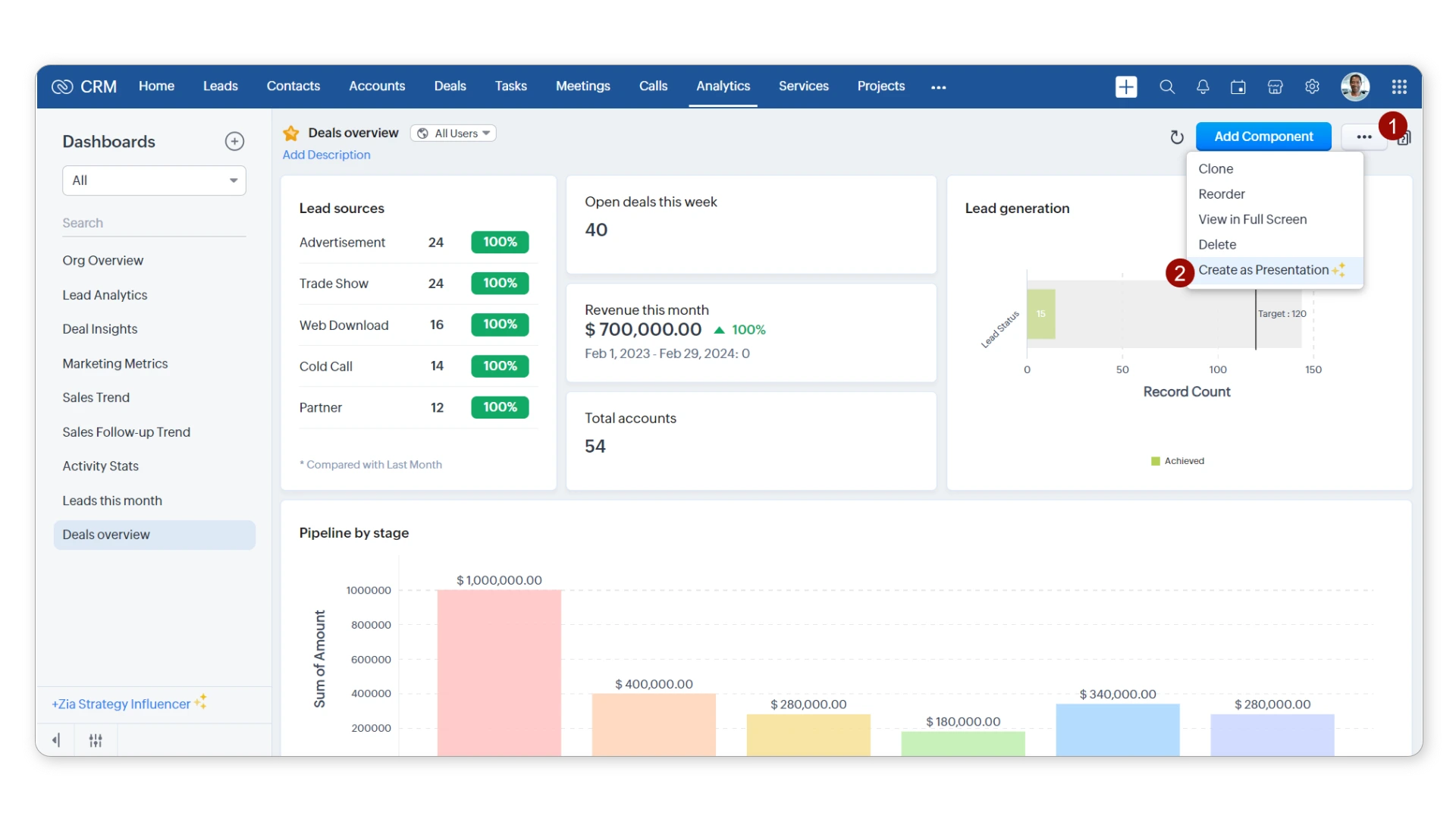
Zoho CRM sits inside a broader ecosystem of 40-plus applications. That context shapes almost every product decision Zoho has made. The CRM shares a single customer record with Zoho Campaigns, Zoho Desk, Zoho Books, and Zoho Analytics. For companies in the Zoho ecosystem, that shared data layer is more reliable than what you get through third-party integrations.
Key Features
- Pipeline management: Multiple sales pipelines with configurable deal stages, drag-and-drop deal view, and Blueprint for enforcing mandatory process steps.
- Marketing automation: Built-in email campaigns, lead scoring, web-to-lead forms, and lead and contact management without a separate marketing tool.
- Workflow automation: Cross-module automation that triggers actions in Zoho Desk or Zoho Projects directly from CRM events, including deal stage changes and field updates.
- Zia AI: Built-in AI sales assistant that scores leads, predicts deal outcomes, and flags pipeline anomalies before they become missed forecasts.
Pricing Structure

- Free: Up to 3 users, core CRM features only
- Standard: $14/user/month (billed annually)
- Professional: $23/user/month
- Enterprise: $40/user/month
- Ultimate: $52/user/month
- Zoho One: $37/user/month for the entire Zoho suite
- Pricing verified June 2026. Annual billing required for advertised rates.
Our Take
Zoho CRM earns its value when the business problem extends beyond closing deals. If your reps need a contact's service history before calling, or if marketing needs to fire an email sequence when a deal reaches a certain stage, Zoho handles that natively. The trade-off is setup time and a steeper learning curve. The platform rewards teams that invest in configuration. It penalizes teams that deploy the defaults and move on.
Teams weighing the full field should also read our best Zoho CRM alternatives breakdown before committing.

Pipedrive started as a visual sales pipeline tool, and that origin shapes every design decision the company makes. The pipeline interface is among the clearest in the CRM market. Every deal, every stage, and every rep's activity shows in a single Kanban view without navigating submenus. For sales teams that live in their pipeline all day, that focus is a real advantage, not a compromise.
Key Features
- Visual sales pipeline: Drag-and-drop Kanban with deal rotting indicators, multiple pipeline views, and custom deal stages configurable per team.
- Sales Automation: Automated email sequences, task creation on stage changes, and activity reminders built into the platform without requiring Zapier or Make for basic flows.
- Email integration: Two-way email sync with open tracking and email insights visible directly in the deal view.
- Nova AI: Pipedrive's AI assistant surfaces deal recommendations and flags at-risk opportunities based on rep activity patterns.
Pricing Structure

- Essential: $14/user/month (billed annually)
- Advanced: $34/user/month
- Professional: $49/user/month
- Power: $64/user/month
- Enterprise: $99/user/month
- Pricing verified June 2026. Annual billing required for advertised rates.
Our Take
Pipedrive delivers its best value between the Advanced and Professional tiers. A sales team of 10 to 30 reps gets a polished pipeline tool with solid automation features and 400-plus native integrations through the Pipedrive Marketplace. The platform hits its ceiling when companies need marketing automation or customer support handled in the same system. At that point, teams either stack additional tools through Zapier or Make, or revisit the platform choice altogether.
Here is how zoho crm vs pipedrive breaks down across the categories that drive most CRM buying decisions.
Pipeline Management
Pipedrive's pipeline management is what the platform is built around. The drag-and-drop deal view is faster to navigate than Zoho CRM's default layout. The deal rotting feature flags deals gone quiet past a set window. Zoho CRM supports multiple pipelines and Blueprint, which enforces mandatory approval steps for compliance-driven teams.
Winner: Pipedrive for speed and day-to-day usability. Zoho CRM wins when process enforcement and mandatory deal stage controls are required.
Automation and Integrations
Pipedrive covers what most sales-only teams need: email sequences, stage-based triggers, and lead assignment. Anything beyond that goes through Zapier or Make. Zoho CRM's automation runs deeper. When a deal closes in CRM, it can update Zoho Projects, Zoho Desk, and Zoho Campaigns automatically. That's the clearest reason companies already in the Zoho ecosystem don't need middleware.
Winner: Zoho CRM for teams already in the Zoho ecosystem. Pipedrive wins for lean, sales-only stacks that don't need cross-department data sharing.
Most CRM projects fail not because of the platform. Because of the plan.
Poor scoping, skipped user training, and rushed data migration are behind most CRM failures. Not the software. Capital S helps you avoid those mistakes before they happen.
User Interface and Learning Curve
Pipedrive's user experience is one of its clearest competitive advantages. Most reps are productive within hours of signup. The mobile app closely mirrors the desktop experience. New users can log a deal, add a call note, and set a follow-up without any training.
Zoho CRM has improved its interface over the past two years. Enterprise and Ultimate tiers still carry configuration depth that takes real time to learn. Teams willing to invest in setup get a system that fits their process exactly. Teams that skip it tend to underuse what they're paying for.
Winner: Pipedrive on user experience and time-to-productivity, particularly for teams with high rep turnover.
Pricing and Total Cost of Ownership
Both platforms start at $14/user/month on annual plans. The gap opens at the top. Zoho CRM's Ultimate tier is $52 per user. Pipedrive's Enterprise plan is $99.
Beyond the base subscription, Pipedrive charges separately for the Campaigns module and AI features on higher tiers. Zoho CRM bundles more at each tier, and Zoho One at $37/user covers the full suite. For a team of 20 or more reps, run a three-year model. The cost difference between pipedrive vs zoho crm becomes a real budget line.
Winner: Zoho CRM on total cost, especially for teams using more than one business tool alongside the CRM.
AI Features and Reporting
Zia AI gives Zoho CRM users lead scoring, deal prediction, and anomaly detection across pipeline and activity data. It works best with enough historical data to train on. Teams in their first year see limited value. Pipedrive's Nova AI is simpler: it flags at-risk deals and surfaces next-step recommendations based on rep behavior.
For reporting, Zoho CRM has more native depth. Zoho Analytics connects directly to the CRM for teams that need custom dashboards beyond the built-in report builder.
Winner: Zoho CRM on AI depth and reporting. Pipedrive wins if immediate usability matters more than analytical sophistication.

- G2: 4.1 out of 5 (2,700+ reviews)
- Capterra: 4.3 out of 5 (6,700+ reviews)
- What users praise: Value for price, the breadth of the Zoho ecosystem, and the depth of customization available at SMB-level pricing
- Common criticism: Initial setup complexity, inconsistent customer support response times on lower tiers, and an interface that feels dense before it is properly configured
- Bottom line: Zoho CRM earns strong marks from teams that invest time configuring it to match their actual sales process; teams that skip setup consistently underuse what they are paying for

- G2: 4.3 out of 5 (2,000+ reviews)
- Capterra: 4.5 out of 5 (3,000+ reviews)
- What users praise: Interface clarity, fast onboarding, and the visual sales pipeline that gives managers immediate deal-stage visibility without a training investment
- Common criticism: Limited built-in marketing tools, reporting that does not scale well to larger teams, and add-on costs that stack up quickly on Advanced and above
- Bottom line: Pipedrive scores consistently well because it delivers exactly what it promises: a focused, usable sales pipeline tool that reps actually adopt
Zoho CRM Pros and Cons
Pipedrive Pros and Cons
Total Cost of Ownership and Budget Planning
The monthly license is rarely the largest line item in a CRM project. Budget also for data migration, integration setup, and user training time. A Pipedrive implementation starting at $14/user/month can reach $40 to $60 per user when you factor in the Campaigns add-on, AI features at higher tiers, and phone support. A Zoho CRM setup may carry a higher upfront configuration cost, but the per-user ceiling is lower and the feature breadth is greater per dollar. Model a three-year total cost before deciding, not just the monthly subscription rate.
User Adoption and Change Management
The most common CRM failure mode is adoption, not feature gaps. Reps who skip deal logging make both platforms worthless. The software doesn't matter if the data isn't there. Pipedrive's advantage here is real: low resistance, fast ramp-up.
Zoho CRM adoption improves when the platform reflects the team's actual process, not the out-of-the-box defaults. Assign a CRM champion internally. Set data entry standards before go-live and plan two to four weeks of reinforcement after launch. Our Salesforce managed services and CRM customization work covers this phase for teams moving to more complex platforms.
Most teams arrive at the pipedrive vs zoho crm decision knowing their budget. The harder question is what the CRM needs to solve for the next three years. Sales-only teams with straightforward pipelines tend to do well with Pipedrive. Companies consolidating tools or connecting sales to marketing automation get more from Zoho CRM.
Capital S has guided companies in private equity, medical devices, and professional services through this exact decision. We know where each platform works well and where it creates friction. For teams that have outgrown both options, we work through transitions to Salesforce implementation when complexity demands it. Talk to our team if you are making this call under a real deadline.
For broader context on where Zoho fits the CRM market, see our Zoho CRM vs Salesforce comparison. If you are still comparing options, the HubSpot alternatives guide covers several platforms worth considering alongside these two.
We've implemented Salesforce across private equity, medtech, pharma, and more.
Our implementations go beyond licensing. We scope, configure, integrate, and train. Your team will actually use what we build.
