

HubSpot starts affordable, then doesn't. Costs that look manageable at 2,000 contacts get uncomfortable fast at 50,000. Sales teams hit a separate wall: the CRM runs shallow on complex pipelines and regulated-industry compliance. Five platforms below address both problems.
Not sure which HubSpot alternative fits your team?
We help companies across private equity, life sciences, and professional services match the right CRM to how they actually sell.
HubSpot built its name by making inbound marketing accessible without enterprise software prices. The free tier bundles email, landing pages, and contact management in one place. That was still unusual when HubSpot launched it, and most competitors still charge for what HubSpot gives away. Setup takes hours, not weeks.
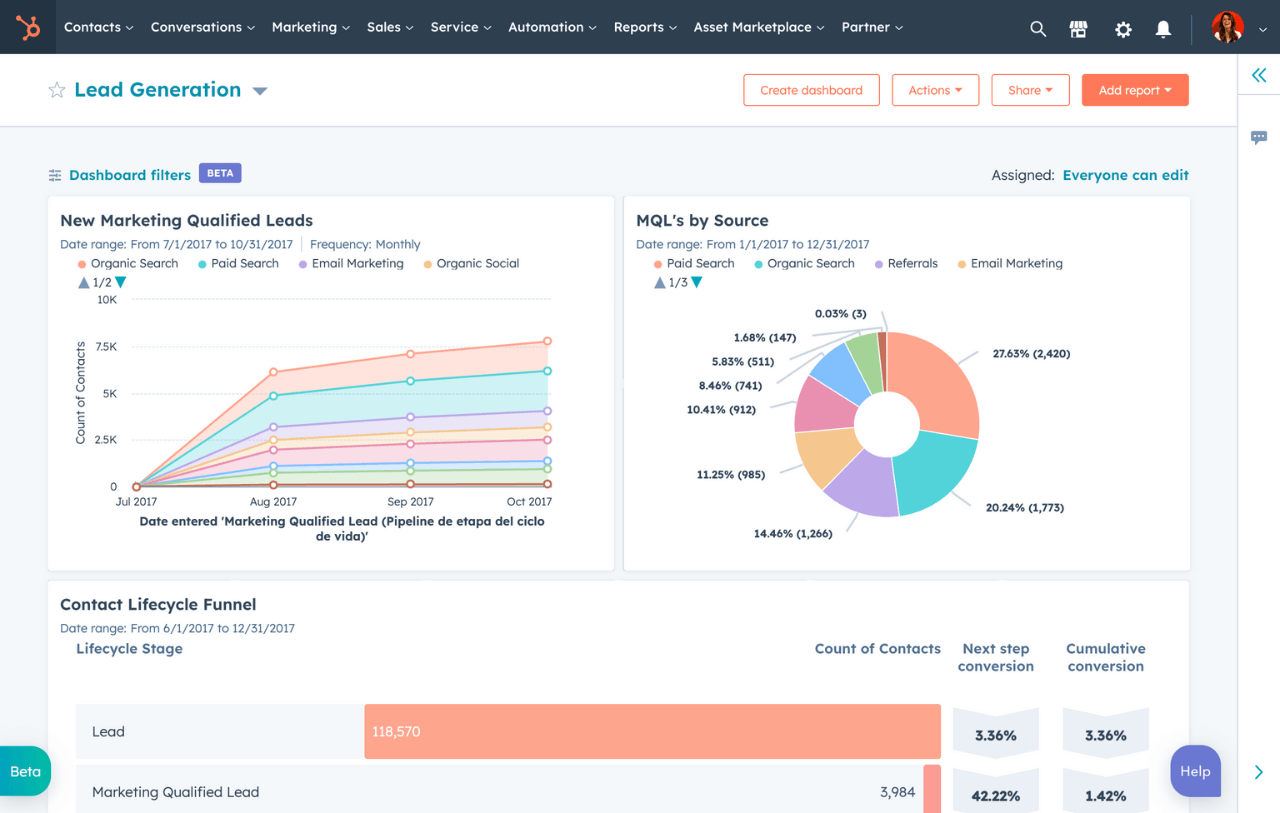
It works well for SMBs with standard sales processes and contact lists under 50,000. The real appeal is that marketing and sales work from the same contact records. When a lead converts, the history travels with it. That kind of continuity between teams is harder to replicate than it sounds.
Growth is where the model breaks down. HubSpot prices by contact volume, not by users. Costs can double or triple as the database grows. Moving from Starter to Professional hits most teams at $890 per month for three seats.

Most teams leave HubSpot over price, but the story is usually more specific than that. The model charges by contact volume, not by team size. A company at 50,000 contacts pays dramatically more than one at 5,000. Most teams don't see it coming until the renewal arrives.
Customization is the second trigger. HubSpot's pipeline management handles standard sales processes without trouble. Once you add multiple stages, conditional logic, or regulated-industry data requirements, the platform hits its limits fast. Teams with complex deal structures end up working around the platform rather than with it.
Marketing-heavy teams hit a different wall. HubSpot's CRM isn't as deep as its marketing tools suggest. Platforms like ActiveCampaign offer far more email automation for less money. Teams built around lead scoring often hit the automation ceiling before they ever notice the pricing one.
The question isn't which platform is best overall. It's which one solves your specific problem. Each platform below targets a different HubSpot limitation.
Salesforce gets compared to HubSpot often, but the comparison undersells what it actually is. It's a platform, not just a CRM. Complex sales processes, multi-division org structures, and regulated-industry data requirements all fall within its scope. When a standard CRM starts showing its limits, Salesforce is where most serious evaluations end up.

Features and Capabilities
- Sales Cloud covers opportunity management, pipeline automation, and Einstein AI forecasting. Sales leaders get forward-looking revenue data, not just a snapshot of current pipeline.
- Pardot and Marketing Cloud go deep on automation, email campaigns, and lead scoring. No comparable CRM at any price comes close on that depth.
- AppExchange offers 5,000+ integrations, including Zapier, Slack, and Gmail. If a tool your team uses doesn't have a Salesforce connector, it's probably not worth integrating with anyway.
- Custom objects and Apex code let you model any data structure the org actually needs. Most Salesforce customers never hit a ceiling on what's configurable.
Pricing and Plans
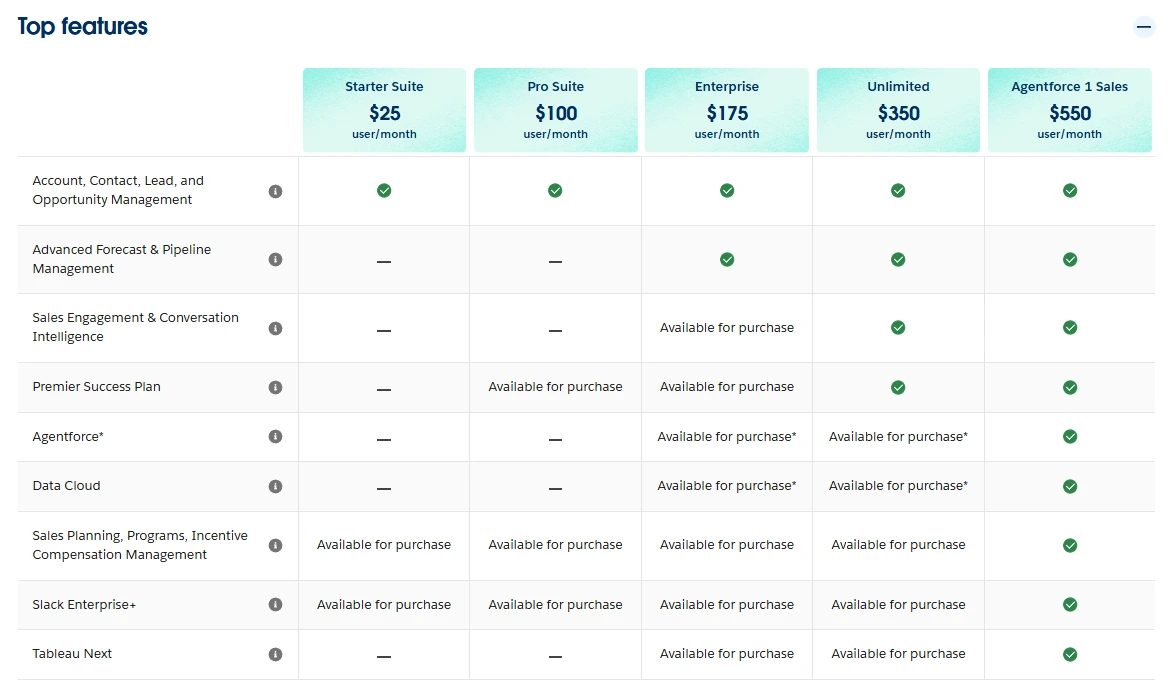
Priced per user, not per contact. Contact growth never inflates the bill.
Pros and Cons
For a detailed breakdown, the HubSpot vs Salesforce comparison covers the key tradeoffs across sales, marketing, and total cost of ownership.
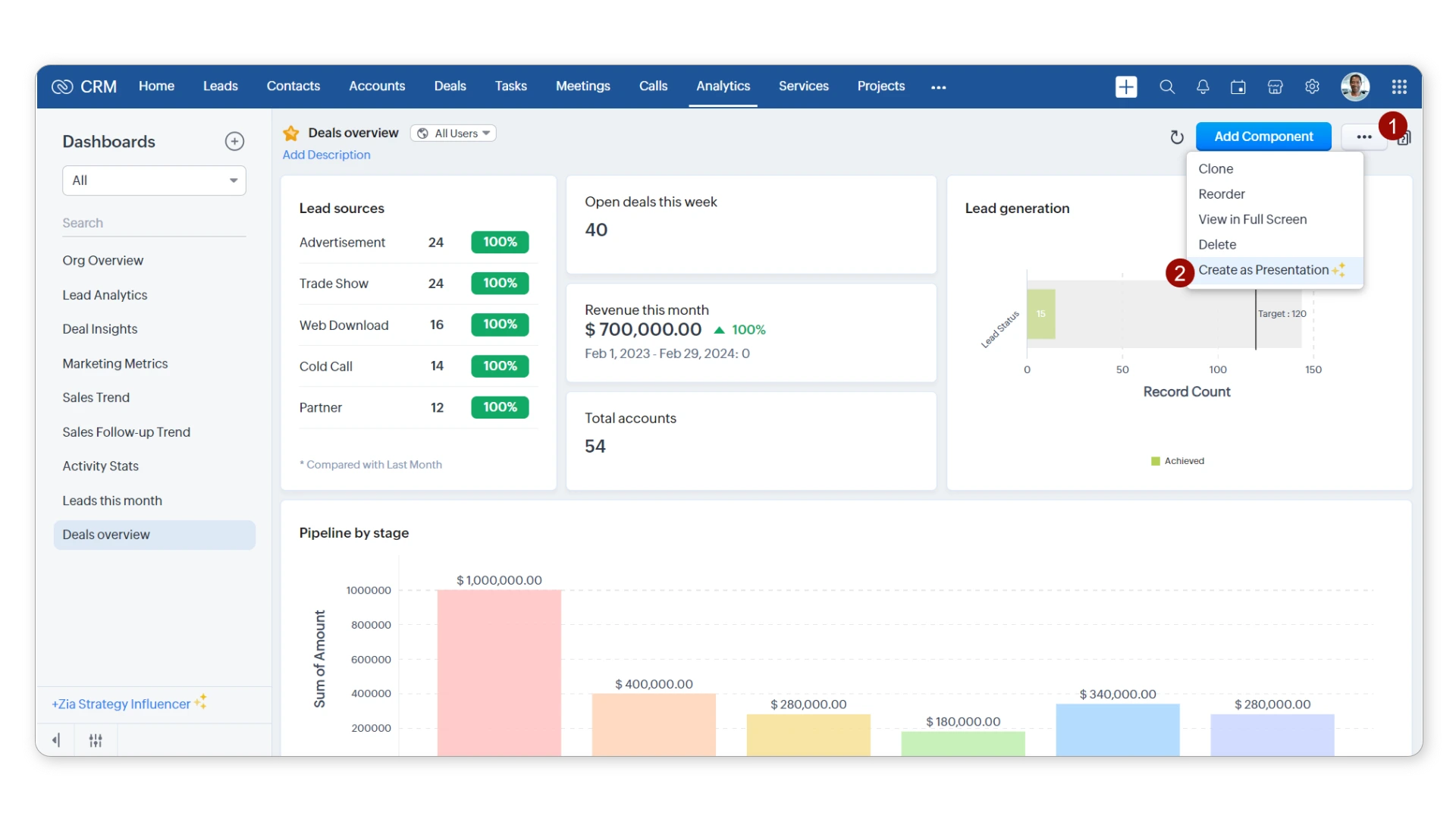
Zoho CRM is the most direct answer to HubSpot's pricing problem. Where HubSpot charges by contact volume, Zoho charges per user. That single difference changes the math quickly as the database grows. It covers CRM, email marketing, automation, and landing pages without a separate subscription for any of it.
Features and Capabilities
- Multi-pipeline management with kanban views gives sales teams clear visibility over every active deal.
- Zia AI handles lead scoring, sales predictions, and workflow suggestions. Most teams find it cuts manual triage without needing an ops hire to manage it.
- Email marketing, automation, and landing pages are built in. Most teams won't need additional platforms for any of those functions.
- 40+ native Zoho integrations cover accounting, project management, and customer support. No extra licensing required.
Pricing and Plans

Significantly cheaper than HubSpot at every tier. Cost stays flat as contacts grow.
Pros and Cons
Teams that want to explore Zoho further should read the Zoho CRM alternatives guide before committing.
Pipedrive exists to make pipeline management fast and frictionless, and it doesn't try to do anything else. No marketing automation, no bloated feature sets. For sales-first teams slowed down by HubSpot's complexity, that focus is the whole appeal.

Features and Capabilities
- Visual kanban pipeline with drag-and-drop deal management. Reps know at a glance what needs attention this week.
- Activity-based selling with automated reminders keeps follow-up on track without manual effort from reps.
- Two-way email sync with Gmail and Outlook. Reps never have to log activity separately.
- Workflow automation moves deals and sends follow-ups automatically. No coding or IT support required.
Pricing and Plans

No free tier. Cost doesn't change as the contact database grows.
Pros and Cons
Sales teams weighing both options should read the Pipedrive vs HubSpot comparison before deciding.
The problem might not be the platform
Sometimes the real issue is disconnected integrations, messy data, or workflows that were never properly configured. We fix that.
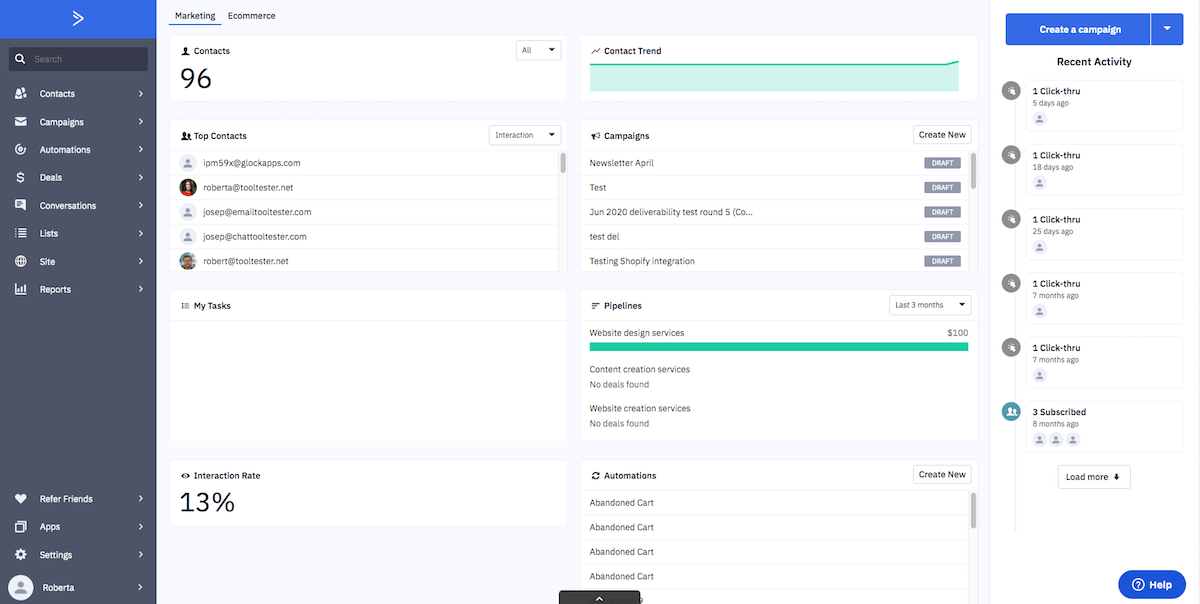
If HubSpot's automation is the frustration, ActiveCampaign is usually the right move. It's built around behavioral data, not just contact fields. Automation triggers on what contacts actually do, not just who they are. Campaigns built on behavior outperform ones built on contact fields alone, and the gap shows up quickly.
Features and Capabilities
- 850+ pre-built automation workflow templates. Almost every common sales and marketing scenario has a starting point ready to go.
- Lead scoring based on behavioral data, not just contact fields. Sales teams can prioritize the right contacts automatically.
- Email marketing with A/B testing and strong deliverability infrastructure. Less campaign waste, better engagement rates.
- 900+ integrations including Zapier and Salesforce. Existing tools connect without custom workflows.
Pricing and Plans

Pricing scales with contact volume, like HubSpot. ActiveCampaign charges less per contact at every threshold.
Pros and Cons
Microsoft Dynamics 365 is the most situational pick on this list. Most SMBs should skip it. But if your org already runs on Microsoft 365, Teams, and SharePoint, the math changes entirely. No other CRM eliminates that kind of integration friction.

Features and Capabilities
- Native integration with Outlook, Teams, Excel, and SharePoint. Sales activity syncs automatically without extra configuration.
- Copilot AI is embedded directly in Outlook and Teams. Sales insights, email drafts, and meeting summaries appear where reps already work.
- Customer service module covers ticketing and case management. It turns Dynamics into a full support and sales platform.
- Power Platform enables custom apps and workflow automation. No traditional development resources required.
Pricing and Plans
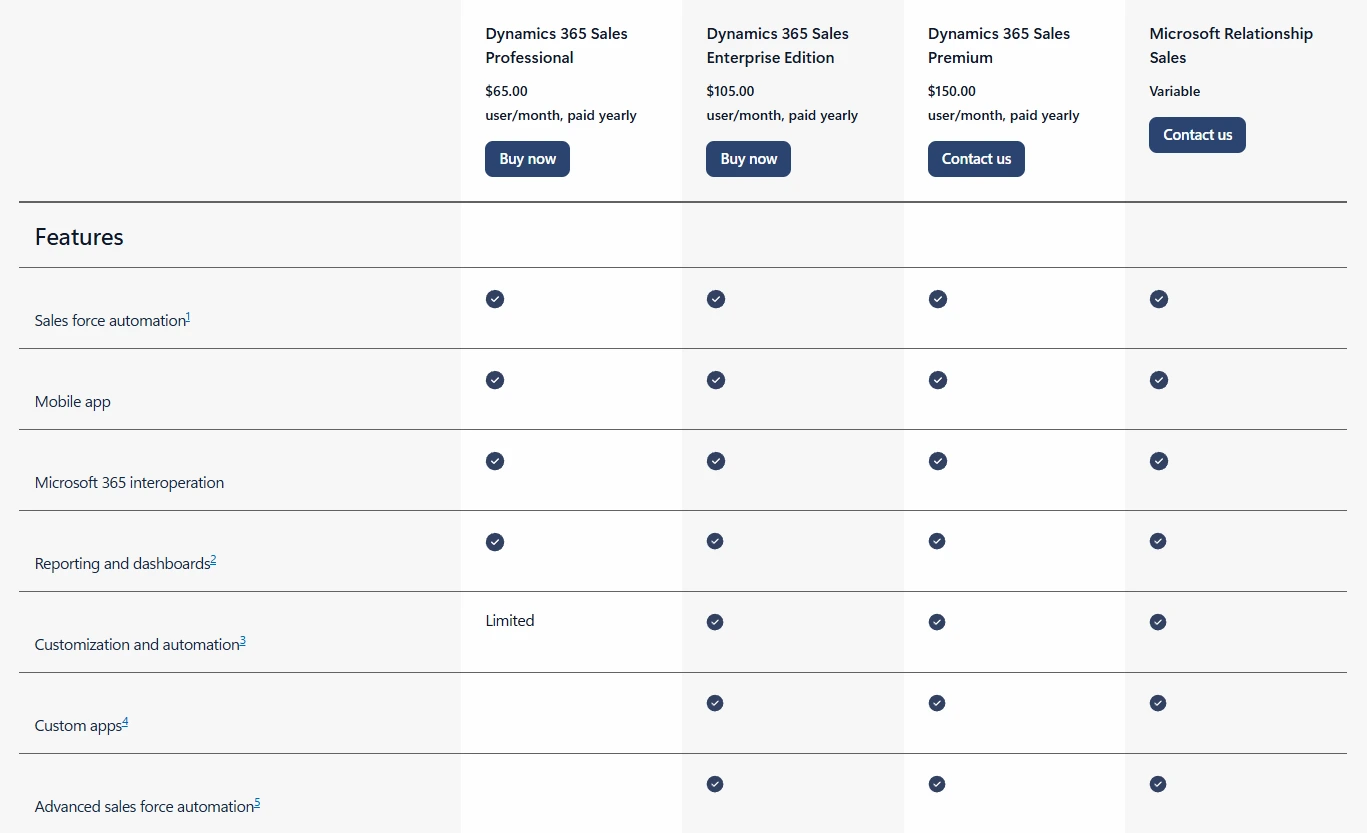
Higher than most mid-market HubSpot alternatives. For orgs already on Microsoft 365, the combined stack often makes sense.
Pros and Cons
Here's how all five stack up on the factors that actually matter when making the switch.
Looking for more than just a feature checklist?
The best CRM for your team depends on how you sell, what you integrate with, and where you're headed. We help you match platform strengths to your actual needs.
These five platforms don't really compete against each other. They solve different problems for different buyers.
Pipedrive is the easy call for sales-first teams that want to move fast. If email automation is the problem, ActiveCampaign is the answer. Zoho CRM makes the most sense when budget is the hard constraint. Microsoft Dynamics 365 belongs on the list only for orgs already committed to Microsoft infrastructure.
Salesforce is the different case. It wins when the sales process is complex or the database has outgrown what standard CRMs handle well. For companies in private equity, life sciences, or regulated industries, it's usually the right long-term bet.
The platform decision is the easy part. Getting the configuration right is where most ROI is lost or won. Capital S provides Salesforce managed services and new deployments for companies in exactly those environments. If you want a straight read before committing, reach out.
